

A custom tracking domain is a subdomain you control, such as link.yourdomain.com, for open and click tracking on your host instead of a shared one. Custom domain tracking and custom email tracking mean that setup. Authentication is a separate job, covered in the MX, SPF, DKIM, and DMARC setup guide.
What is Custom Domain Tracking
The sending tool rewrites each tracked link and the open pixel onto that subdomain, so the URL shows your domain. A tracking domain, or domain tracking, is that hostname.
A tracking subdomain is a name such as link or click under your domain. Keep the CNAME off the apex. First-party (1p) domain tracking means you own that domain. Dedicated click tracking means the host is for click redirects, often with the open pixel, separate from the website and the MX server.
Benefits of Custom Domain Tracking
Brand consistency
Tracking links on your domain match the From line, which is the brand consistency people expect from a custom domain.
A host in your DNS
A shared tracking host is one hostname many senders use. Your subdomain keeps the link in DNS you control. Where the message lands still depends on the sending domain and the copy. See how to avoid spam filters.
Recognizable click links
A link on your domain is a URL the reader can recognize. Write the anchor text so the destination is clear.
Better analytics
You still capture opens, clicks, and conversions in the campaign tool. The custom domain changes which host serves the tracking request.
Reputation management
The tracking host sits on your domain, so a shared public tracker is not your link host. Mailbox reputation stays on the sending domain.
Works with your tracker
The sending platform rewrites links to your host and stores hits in the tracker and CRM you already use.
How to Set up a Custom Tracking Domain
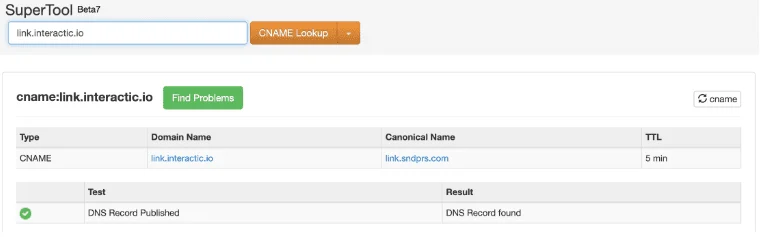
You can set up custom tracking domains if you control DNS and the tool accepts a branded host. The screenshot uses this CNAME. Target: link.sndprs.com. Another tool supplies its own target. Record type: CNAME.
Access your domain provider
Go to the provider where you registered the domain or where you manage DNS.
Create a CNAME record
Set up a new CNAME record pointing to link.sndprs.com.
Example:

Record type: CNAME
Host: link.yourdomain.com
Answer: link.sndprs.com
TTL: Default
If the panel appends the domain, enter link as the host. Enter the full name only when the panel stores it as typed.
Allow time for the new CNAME record to propagate, then query it before you send.
Verify CNAME record status
Check the status with a tool like MXToolbox to confirm it is live. Query the full host, such as link.yourdomain.com.
Check SSL on the tracking host
An SSL email tracking domain is that hostname on HTTPS. Open the https URL after DNS answers, and fix a certificate warning before you send. A lookup can succeed while the certificate still warns.
Add the domain in Manyreach or another sending app
Open your Manyreach account and go to the Senders section.
Click the sender that should use the custom tracking domain.
Go to Settings.
Scroll to the Custom Tracking Domain section, then click Add Custom Tracking Domain.
Enter and confirm the subdomain
Input your tracking subdomain, for example link.yourdomain.com, and add it.
Send a test email
Send a test email to verify the custom tracking domain is functioning correctly.
Change a tracked domain
Publish a CNAME for the new host, confirm the lookup, update the sender, and send a test. New mail should use the new host only after that test. If mail you already sent still uses the old hostname, you can leave that CNAME until those links no longer matter. It is not a second tracker.
What a Short CNAME Guide Leaves Out
A short guide stops after the CNAME. These checks decide whether the hostname matches the tool:
Use a subdomain. A standard CNAME on the apex cannot sit beside the website and MX records on the root.
Use the target your tool shows. This screenshot is link.sndprs.com. A target from another product will not match.
If the panel can proxy that CNAME, leave the proxy off and confirm the lookup returns the target hostname.
This CNAME does not publish SPF, DKIM, or DMARC, and those records do not create the tracking host.
Conclusion
A custom tracking domain is a subdomain and a CNAME, saved on the sender. Test before a live campaign, and authenticate the sending domain separately.
FAQs
What is a custom tracking domain?
It is a subdomain you own that serves open and click tracking through a CNAME.
Can I set up custom tracking domains?
Yes. Add a CNAME on a free subdomain, save it on the sender, and test.
What is an SSL email tracking domain?
It is the tracking hostname served over HTTPS with a valid certificate.
How do I change a tracked domain?
Add the new CNAME, update the sender, and test. Leave the old CNAME only while you still want links in mail you already sent to resolve.
What is subdomain tracking?
It is a label under your domain, such as link, so the root keeps MX and the website.
 Share Article