
Heads up means a short warning before something happens. A heads-up email (a heads up mail, same thing) is that warning in writing, so someone can prepare. A heads up synonym in professional email is advance notice, a quick update, or "please be informed."
A heads-up email is a way to let business prospects, clients, and teammates know about something important. You send these emails when you want someone to prepare for a meeting, deadline, proposal, or a policy change without being pushy.
What is the Meaning of Heads-Up Email?
The heads-up email meaning is a short, informative note you send to let someone know about a change, ahead of time. This change could be a meeting, a deadline, or a policy change.
It is a helpful way to give people time to prepare, without sounding pushy. Sometimes it is just a way to stay on someone's radar or build a connection. "Give a heads up" means tell them before it happens. "A little heads up" means a short version of that note.
A good heads-up email template makes the note faster to reuse. Here are templates you can adapt. Where the name or the detail changes, add spintags and keep the structure.
Formal Heads-Up Email
Example:
Subject: Upcoming Policy Review
Dear [Name], this is to inform you that the company will be reviewing internal policies next month. Further details will be communicated soon.
Heads-Up Email for Policy Change
Example:
Subject: Policy update
Hi team, wanted to inform you in advance that we'll be making changes to the leave policy soon. Official update coming next week.
Heads-Up for Meeting Re-schedule
Example:
Subject: Updated meeting time
Hi [Name], just a quick nudge to let you know our meeting has been moved to 3 PM instead of 11 AM. Hope the new time works.
For a fuller note when a meeting has been rescheduled, keep the new time, the old time, and why it moved.
Heads-Up for Service Downtime
Example:
Subject: Maintenance alert
Hi [Name], our system will be down for maintenance this Monday from 2 AM to 4 AM CET. So please plan your work accordingly.
Heads-Up for Product Launch
Example:
Subject: Product Launch next week!
Hi [Name], exciting news! Our new product is going live next week. Can't wait to share more with you.
Heads-Up Before a Proposal
Example:
Subject: Proposal Coming Tomorrow
Hi [Name], just a quick reminder to let you know I'll be sharing our proposal tomorrow morning by 11:30. Please feel free to review it at your convenience.
Heads-Up Before a Deadline
Example:
Subject: Deadline Reminder
Hi [Name], just giving you a heads-up that the project deadline is this Friday. Let me know if you need any extra support to wrap things up.
Heads-Up Email to Manager
Example:
Subject: Project Update Ahead of Schedule
Hi [Manager's Name], just a quick heads-up that our team has completed the initial phase of the project earlier than expected. We'll begin the next stage tomorrow and will share the updated progress report by the end of day Friday.
Heads Up Synonyms for Professional Emails
A heads up synonym is another phrase for a warning before something happens. Another word for heads up is advance notice, forewarning, or prior notice. Another way to say heads up professionally is to name the change: "The leave policy is changing next week" beats "just a heads up" with nothing under it.
Phrases that stand in for heads up:
- Advance notice: "I am writing to give you advance notice that the review is next month."
- Prior notice: "This is prior notice of a short maintenance window."
- Quick update: "Quick update: our meeting moved from 11 AM to 3 PM."
- Please be informed: formal, for a client or a policy note.
- Please be advised: the same job, a little stiffer.
- For your awareness: they should know, and you are not asking for a decision.
- I wanted to let you know in advance: a polite opener for a small change.
- Ahead of time: "I am flagging this ahead of time so you can plan."
Give you a heads up means tell you before it happens. A courtesy heads-up is a polite early warning so the other person is not surprised. The article is "a heads up," because "heads" starts with a consonant sound. A formal word for heads up is advance notice.
Heads-up Email, Reminder Email & Follow-up Email: Key Differences
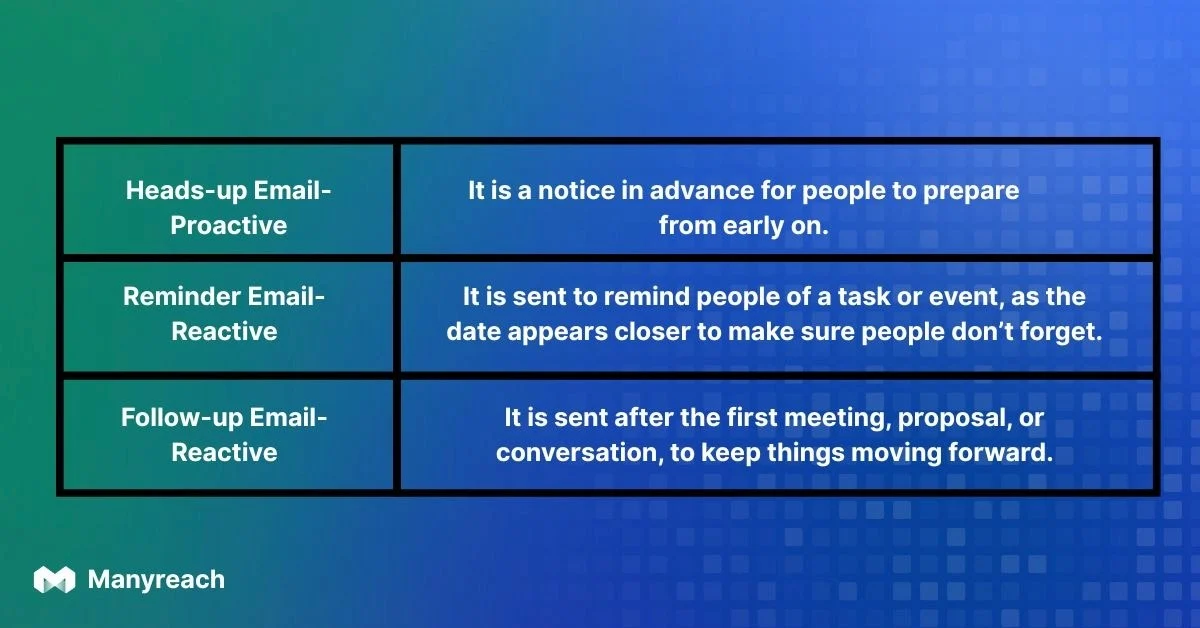
A heads-up email is not the same as a reminder email or a follow-up email. A heads-up is written so people can prepare for something before it happens.
A reminder goes out close to the event, often a day before, so they do not forget a plan they already know. A follow-up goes out after the meeting, the proposal, or a missed reply. The older wording mixed "a day before and after" into one bucket. Those are two different sends.
Here is the same comparison in the images:

Why Do Heads-Up Emails Work?
Heads-up emails work because they show respect for the recipient's time and keep communication clear and proactive. Keep a simple notice short enough that the change, the timing, and any ask are visible at a glance.
That shows you value their time, and that you want to build better professional relationships.
Here are the primary reasons these notes help:
Help You to Inform
When you send a heads-up email, you are telling prospects, clients, or teammates about something important before it lands on them. It shows you value their time, and it leaves room for a calmer reply.
Help You Build Trust
When you tell people about a change instead of enforcing it with no warning, they have less reason to feel ambushed. It shows you value transparency and their time. So heads-up emails help you keep a professional tone with prospects and clients.
How to Write a Great Heads-Up Email
A good heads-up email sample is one where context is added so it does not feel abrupt.
Here is an example: "Our meeting has been rescheduled due to a conflict."
For business heads-up emails to a manager or a team, focus on action items so everyone knows what is expected.
If you are wondering how to say "just a heads up" professionally, use the steps below.
Start With the Purpose
Let the person know why you are sending the email right at the beginning. Say things like: "Just a quick heads-up..." or "Wanted to let you know in advance..." These lines are direct and open with a purpose.
Get to the Point Quickly
Remember it is not a story, so get to the point quickly. Say what is happening, why, when it is happening, and what they should expect. That is it.
Keep it Short
When the news is simple, a few lines are enough: what is happening, when, and what you need from them. In a short email, every word counts, so avoid redundant words, and make sure every word makes sense.
Use a Friendly and Professional Tone
Stay polite, but do not sound too casual or too strict. A friendly, clear tone works best for this kind of email.
Add Context
While you are writing a heads-up email to a client, always include context. For example, instead of just saying "Meeting rescheduled," mention the reason so it does not feel abrupt.
Here is a better version: "Meeting rescheduled due to a conflict on our side." That looks transparent, and it respects the recipient's time.
Tip: If you are writing a business heads-up email to your manager or team, always focus on action items so that everyone knows what is expected.
Format of a Heads-Up Email
An effective heads-up email structure must include these 3 things:
- A crisp heads-up email subject
- A clear body
- A closing line that says what happens next
Here is how to format each part:
Subject Line
Name the change in the subject so people know what the email is about before they open it. "Proposal Coming Tomorrow" does that. "Just heads-up" on its own does not.
Here are two examples:
- Heads-up on tomorrow's meeting
- Policy Change
These name the topic, so they work better than "Just heads-up" alone.
Body
Start with your reason, then explain what to expect. Add any action items only if needed.
Closing
When you are closing, show that you value their time. Wrap it up with something like:
- Do let me know if you need anything.
- I am sending this email to keep you in the loop.

FAQs
What is a professional synonym for "heads up"?
Advance notice, prior notice, or a quick update. In a client or policy note, "please be informed" is the formal version. Naming the change ("The leave policy is changing next week") is clearer than "just a heads up" with no detail under it.
How do I write a heads-up email to a client?
Keep it professional and short. Say why you are writing, what will happen, when, and what they should expect next. The proposal, downtime, and policy templates above are the pattern.
What is the difference between a heads-up email and a reminder email?
A heads-up email informs in advance so someone can prepare. A reminder email reinforces a plan they already know, closer to the event. A follow-up goes out after the meeting, the proposal, or a missed reply.
Is "just a heads-up" professional to use in business emails?
Yes, with people you already work with, if the subject states the point. You can also use "quick update" or "please be informed" when you want a more formal tone.
What subject line should I use in a heads-up email?
Name the change. "Heads-up on tomorrow's meeting," "Quick update: policy change," or "Proposal coming tomorrow" all tell the reader what is inside. "Just heads-up" does not.
Conclusion
Heads-up emails are a small, practical way to build trust, avoid surprises, and keep people in the loop. Whether you are writing before a meeting, a policy update, or a client proposal, stay short, clear, and respectful.
If the same notice has to go to many people, Manyreach can send it as a sequence with merge fields, so the name and the detail can change for each recipient. The change, the time, and the ask still have to be true.
 Share Article