
You avoid spam filters by proving the domain is yours with SPF, DKIM, and DMARC, warming the mailbox, limiting how many cold emails each address sends per day, and writing short plain messages to people on a clean list.
Filters also score the words you use, the links, the sender reputation, and whether recipients delete the mail or mark it as spam. Cold email fails when it never reaches the inbox. Treat deliverability as part of the campaign, not as something you check after the replies do not come.
Md, Riad at Rank Wizards and Justin Hillsbering at iClientCare built outreach practices that depend on replies. None of that matters if the mail never reaches the inbox.
What are Spam Filters?
Spam filters are tools that block unwanted or harmful emails from reaching your inbox. They check for spammy words, suspicious links, or fake sender details. Filters also look at the sender's reputation and use smart technology to learn and improve. Good emails go through, while spam gets redirected or blocked.
How do Spam Filters filter Emails?
Spam filters analyze incoming emails using a combination of techniques to determine whether a message is legitimate or spam. Here's how they typically function:
Content Filtering
Examines the content of the email, such as subject lines, body text, and attachments, for keywords or phrases commonly associated with spam (e.g., "free money," "click here").
Some filters flag messages with excessive use of capital letters, exclamation marks, or suspicious links.
Header Analysis
Reviews the email header, which includes metadata like sender information, IP addresses, and the route the email took to reach the recipient.
Emails with forged or incomplete headers may be flagged.
Sender Reputation
Evaluates the reputation of the sender's domain or IP address. Domains with a history of sending spam or not properly authenticated (e.g., lacking SPF, DKIM, or DMARC records) are more likely to be blocked.
Low sender scores often trigger spam filters.
Behavioral Analysis
Monitors user behavior, such as marking emails as spam or deleting without opening, to refine the spam detection process.
Over time, filters learn from user preferences.
Bayesian Filtering
Uses statistical analysis to compare incoming emails to known spam and legitimate emails. This method helps determine the likelihood of a message being spam based on its content and structure.
Blacklists and Whitelists
Filters refer to blacklists (lists of known spam senders) and whitelists (approved senders) to allow or block emails accordingly.
Warm-up is how senders build a history before they raise volume. It does not remove a blacklist you already have.
Attachment Scanning
Checks attachments for malicious software, executable files, or suspicious content.
Spam Traps
Some systems use "spam traps" (email addresses set up purely to catch spam) to identify and block spammers.
Machine Learning Algorithms
Modern spam filters employ AI and machine learning to continuously improve detection based on patterns and new spam tactics.
How to Avoid Spam Filters [Cold Email Checklist]
Follow the tips below to avoid spam filters in your cold email campaigns. This is the deliverability checklist to finish before you click the send button.
Use a Secondary Domain
A separate domain is a common way to keep cold outreach off your primary domain. It does not make the cold mail safe, and an older domain is not automatically trusted. The extra domain still needs authentication, warmup, and a clean list. A domain with no real mail history, or a bad one, can still be filtered.
For example, Manyreach.com is our primary domain.
So, instead of manyreach.com, a cold-email program might use a separate domain such as getmanyreach.com. The name is only an example.
Divide Email Volume Across Addresses
Don't overwhelm email servers by sending a large share of the campaign from a single new address. Start a new sender well below the volume you want later, use more than one address, and raise the daily amount only after warmup. For how to split that volume, read How Many Cold Emails Can I Send a Day.
Use Google Workspace
Google Workspace is a common mailbox for cold email. It does not by itself keep mail out of spam. A Google account can still be filtered when the domain is not authenticated, the list is dirty, or a new address sends too much. Other mailbox providers can deliver under those same conditions. Judge the setup by bounces and spam complaints, not by the provider name.
Complete Email Authentication
Setting up email authentication shows which servers may send for your domain. Make sure your domain is verified with MX records, SPF, DKIM, and DMARC. Those records do not guarantee inbox placement. Mail can still be filtered if the list, the volume, or the content looks risky.
Warm the Mailbox Before You Scale
Don't go straight into sending hundreds of emails. Warm a new address by starting small and slowly increasing volume over several weeks. That builds a sending history. It does not guarantee your messages will skip the spam folder.
Use Clean, Verified, Highly Targeted Lead Lists
Sending emails to bad or outdated lists can hurt your reputation. Make sure your lists are verified and only target people who are actually relevant to what you offer. This improves the chance of engagement and cuts bounces.
Use Short Subject Lines
Keep your subject lines short and to the point. Long or vague subject lines can trigger spam filters. Aim for something that's clear and catches the reader's attention without sounding too "salesy."
Send Text-Only Emails
Skip the fancy formatting, big images, or lots of links. Send simple, text-only emails that look like personal messages. This makes your email less likely to be flagged as spam and more likely to be read.
Many sending tools let you choose basic HTML or plain text. Choose plain text when you want the note to look like a person wrote it.
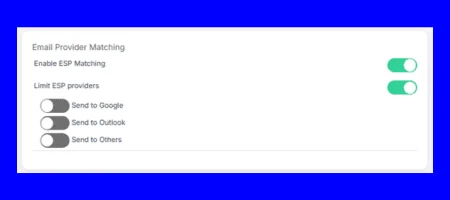
Switch the ESP-Matching Feature On
ESP matching is a feature in some cold email software. You send from a mailbox on the same provider as the recipient. Outlook users in your list get mail from an Outlook sender, and Google users get mail from a Google sender.
Turning this on can help the message look like ordinary mail between two accounts on that provider. It does not fix a bad list or a domain with no authentication.
Do Not Use Spammy Words
Avoid using words like "free," "limited time," or "buy now." These words are red flags for spam filters. Use more neutral language and focus on providing value without sounding pushy or promotional.
Try to initiate a conversation.
Use Variables Within Spintax
Spintax helps you create multiple versions of the same email by swapping out certain words. Instead of always writing "We can help you," try using variations like "We can assist you" or "We can support you." This keeps your emails from looking too repetitive.
Example: {|What challenges do you face in {{job position}}?|What solutions have you discovered for overcoming obstacles in {{job position}}?|}
Use Unsubscribe Texts, Not Links
Instead of adding an unsubscribe link, try saying something like, "Reply with 'not interested' if you don't want to hear from us anymore." This looks more personal and reduces the risk of getting flagged by spam filters.
Add Custom Domain Tracking
Generic tracking links sit on a domain you do not control. Use custom tracking links that match your sending domain when you need click data.
A public short link can draw extra scrutiny because many unrelated senders share that short domain. It is not an automatic spam placement. If you do not need a link on the first email, leave it out. If you track clicks, a link on your own domain is the usual safer pattern.
Send Short, Relevant Emails Only
Keep your emails short and to the point. People don't have time to read long, irrelevant emails. If your email is clear, relevant, and gets to the point quickly, it's more likely to be read and responded to.
Use an Email Tracker
If you're a small team that doesn't send bulk emails daily, consider using email tracking software like MailTracker. These tools typically come as Chrome extensions, making them easy to install and use for tracking email opens and engagement. This allows you to identify unresponsive or inactive leads so you can stop mailing them.
Steps to Take When Spam Rates are High
If spam rates remain high despite following the checklist, work through these steps in order. Do not raise volume while you are still diagnosing.
1. Analyze Email Campaign Data Thoroughly
Check Spam Complaints: Review the feedback loop reports from your email service provider (ESP). Address patterns such as specific campaigns, subject lines, or email content triggering complaints.
Segment Non-Engaged Users: Identify and remove or re-engage subscribers who haven't interacted with your emails for a significant period.
2. Verify and Maintain Your Email List
Reconfirm Subscribers: Run a re-permission campaign asking users to confirm their subscription.
Use a List Cleaning Service: Remove invalid, inactive, or disposable email addresses using a trusted service like ZeroBounce or NeverBounce.
3. Audit Technical Setup
SPF, DKIM, DMARC: Ensure these authentication protocols are configured correctly. Misconfigurations often lead to spam classification.
Monitor Your Domain Reputation: Use tools like Google Postmaster Tools or MxToolBox to identify reputation issues and take corrective action.
4. Optimize Email Content
Avoid Spam Triggers: Reevaluate content for words, phrases, or formatting (e.g., excessive punctuation, all caps) that could trigger spam filters.
Personalization: Use subscriber data to create tailored subject lines and body content, improving engagement and reducing spam complaints.
Review Links: Ensure all links are functional, relevant, and point to reputable domains.
5. Evaluate Sending Practices
Reduce Email Sending Volume: Gradually increase email volume to establish trust with Internet Service Providers (ISPs).
Use Dedicated IPs: If your ESP offers it, a dedicated IP allows better control over your sender reputation.
Test Campaigns: Use tools like GlockApps or MailTester to test email deliverability before launching campaigns.
6. Engage with Your ESP or a Deliverability Expert
Consult Your ESP: Most ESPs have teams or resources to help resolve persistent deliverability issues.
Hire a Consultant: If problems persist, engage a deliverability expert for a deeper analysis and tailored solutions.
7. Monitor Regularly
Set up automated monitoring for bounce rates, engagement metrics, and reputation scores to catch and resolve issues early.
By consistently evaluating and tweaking these areas, you can address high spam rates more effectively and protect your email deliverability.
Want to Land in Prospects' Primary Inbox?
The primary inbox is the goal, and no software can promise it. Authentication, a warmed mailbox, a clean list, and a short note a person could have typed are what you control. They raise the odds. They do not assure placement.
Cold email still needs a real sending setup: more than one mailbox, a slow ramp, and copy that is not identical every time. Personalization helps because people reply to mail that is about them, and replies are a stronger signal than a tracked open.
Manyreach is a cold email platform with warmup, mailbox rotation, and spintax in sequences. Those support the setup above. They do not replace authentication, list hygiene, or a sensible daily cap.
FAQs
Do short links in emails trigger spam filters?
They can, but a short link is not an automatic spam verdict. Public shorteners are shared by many senders, so some filters treat that domain with more suspicion than a link on yours. Prefer your own domain, or skip the link on the first email if you do not need it.
How to avoid spam traps in cold email?
Spam traps are addresses that exist to catch senders who mail people who never asked to hear from them, or who mail dead addresses. Use a verified list, remove bounces, and stop emailing contacts who never open or reply. Do not buy an old scraped list and warm it up later. The damage happens on the first send.
Which platform helps avoid spam filters for bulk email?
No platform can promise you will avoid spam filters. Look for warmup, mailbox rotation, authentication for each sending domain, and plain-text sending, then follow the volume and list rules on this page. The platform is the sending tool. The filters still judge the domain, the volume, and the mail.
How do agencies keep cold emails out of spam folders?
They often keep cold outreach off the primary domain, but that extra domain still needs authentication, warmup, and a clean list. They warm new mailboxes before they scale, cap daily sends per inbox, and suppress anyone who complains or never engages. The same checklist applies if you send the mail yourself.
Do attachments trigger spam filters?
Filters scan attachments for risky file types. A cold email with an unexpected attachment is easier to block than a short text note. Send the file after they reply, or link to it on your domain.
 Share Article