How to Remind Someone Politely in 2026: 35+ Email Templates
To remind someone politely, you have to be direct but kind. Your goal should focus on bringing back their attention, without sounding pushy or forceful.
Written by

Shatavisha Chatterjee
Published on
July 2, 2025
10
min
Let’s face it - getting ghosted is never fun. And when it’s a business prospect? Even worse.
You’ve carefully written and sent that email, pouring in your effort and expertise. Now what? Crickets.
Sure, they’re busy. But a gentle reminder never hurt anyone, right? So how do you follow up without sounding pushy or desperate?
In this blog, I’ll show you how to remind someone politely, mastering the art of professional, respectful, and effective follow-up emails.
What is a Gentle Reminder Email?
A gentle reminder email is a polite way to nudge someone about a pending task, missed deadline, unanswered message, or upcoming event, without sounding demanding or impatient.
It's often used in business conversations to follow up on invoices, meeting schedules, job applications, or even casual requests.
Think of it as a kind follow-up. You’re simply helping the other person remember something they may have overlooked, while keeping the tone respectful and friendly. A well-written, polite notification email strikes the right balance between being clear and being considerate.

When to Send a Reminder Email
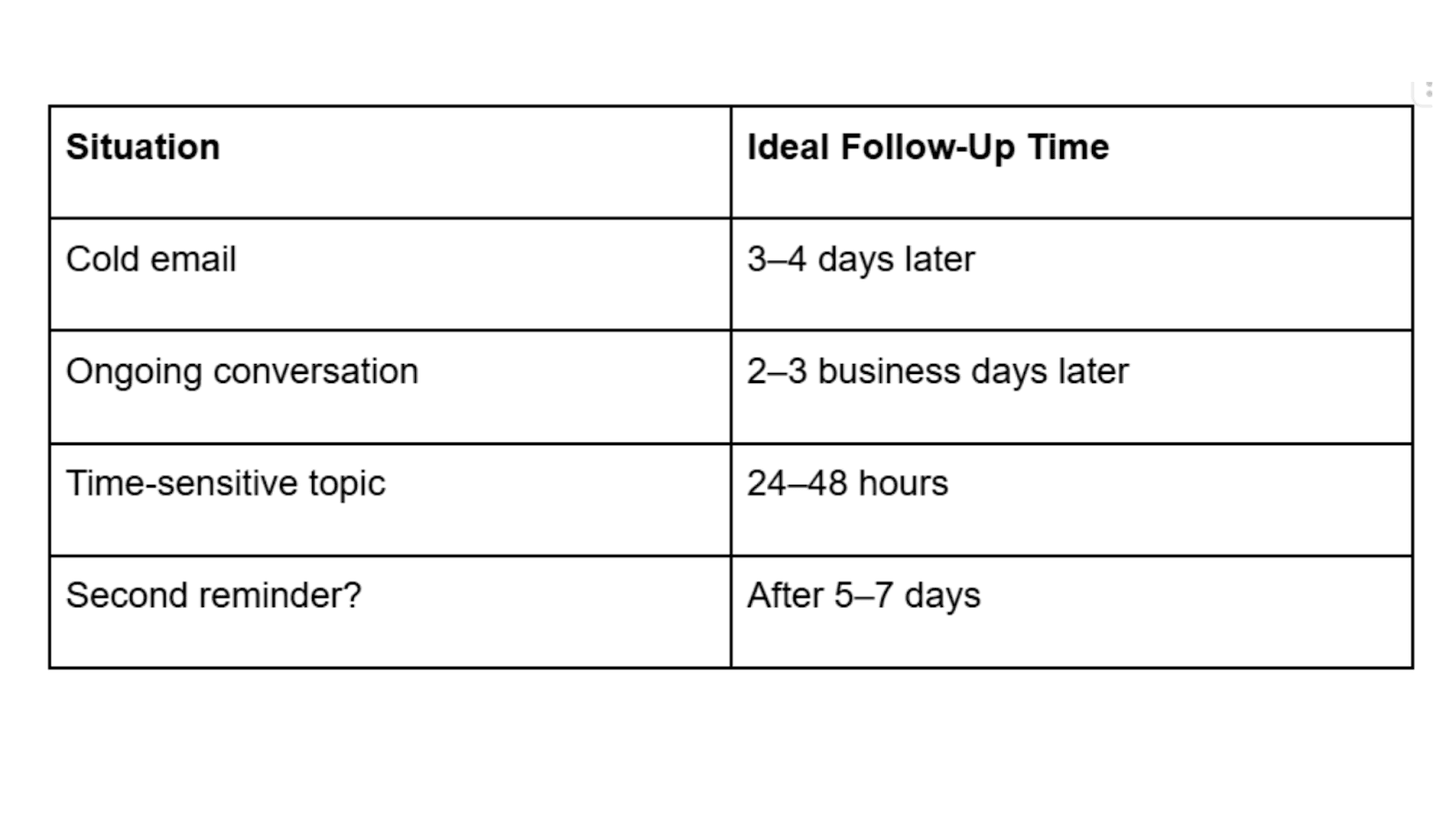
Timing matters. Send your reminder email too soon, and it might come off as impatient. Wait too long, and the other person may forget entirely.
So when’s the right moment to hit send? It depends on the context.
As a rule of thumb:
Wait a few days before following up, especially if it’s your first email reminder.
If it’s something urgent or time-sensitive, you can nudge sooner.
And if you’re sending a second reminder mail, space it out so it doesn’t feel pushy.
For cold emails, you can send up to 5 or 6 emails or more, maintaining healthy intervals between each email.
Use your judgment based on the situation and relationship. A well-timed reminder feels considerate.
Here’s a quick guide:
How to Write a Reminder Email (Step-by-Step)
Writing a polite reminder email might sound simple, but in reality, there’s a framework that you must follow. If you don’t follow this framework, you might face challenges in getting replies.
So here’s a quick breakdown on how to write a reminder email that’s clear, professional, and effective.
To write a good reminder email, you must follow this flow:
The reply should be in the same thread
Always remember to start with a friendly opening
After that briefly restate the context
You must acknowledge the fact that they may be busy
Always offer help or clarification
Finally end your email with a polite call to action
Now let me break it down in detail, so that it becomes better for you to understand:
1. Subject Line
Keep it short and specific, preferably within 4 to 6 words. Remember, the goal is to remind the recipient or prospect, not surprise them.
Best Subject Lines for Polite Reminder Emails:
“Gentle Reminder: [Meeting/Task Name]”
“Following Up On [Topic]”
“Quick Nudge: [What You’re Waiting On]”
[Meeting/Task Name] at [time]
If you're wondering how to send a reminder mail that actually gets opened, a straightforward subject line is a good place to start.
2. Opening Line
Start with context. Mention your last interaction or the reason for reaching out. Be polite and assume good intent.
“Just checking in regarding our last conversation…”
“Hope you're doing well! I wanted to follow up on…”
3. Message Body
Now, get to the point, without sounding too direct. Gently remind them of the task, request, or event. Keep it concise, and always maintain a friendly tone.
“I understand you’re busy, so I just wanted to bring this back to your attention...”
“This is just a kind reminder about the upcoming deadline for…”
This is the part most people overcomplicate. If you’re unsure how to send a reminder message that doesn’t feel awkward, just think: “What would I appreciate reading in their shoes?” If you're still confused, you can try an AI paragraph rewriter. These tools can help fine-tune your message and turn a boring email into something polite, natural, and easy to read.
4. Closing and CTA
Wrap it up with a clear next step or ask. Whether it’s replying, reviewing, or confirming something, be specific.
“Would you be able to take a quick look this week?”
“Let me know if you need anything else from my side.”
“How does [time] at [day] sound to you?”
When you're learning how to give a reminder on mail, this is the key: end with a tone that’s polite, not passive-aggressive.
Top Gentle Reminder Templates
Whether you're following up on an overdue task or nudging someone after no response, a well-crafted reminder can make all the difference. Below are some effective, reminder email templates tailored to different tones and situations.
1. General Reminder Email Sample
Use this when you simply want to send a polite nudge, nothing too casual or overly formal.
Subject: Just a Gentle Reminder
Hi [Name],
Just a gentle reminder regarding [the task, meeting, or request]. Please let me know if there's anything you need from me to move this forward.
Looking forward to your response.
Thanks,
[Your Name]
2. Reminder Email for No Response
This email template is designed for following up when someone hasn't replied to your previous message.
Subject: Following Up on My Previous Email
Hi [First Name],
I wanted to follow up on my earlier email regarding [subject]. I understand things can get busy, so just sending a quick reminder in case it slipped through the cracks.
Would love to hear your thoughts when you get a moment.
Warm regards,
[Your Name]
3. Friendly Tone Reminder Email Sample
Perfect when writing to colleagues or contacts you share a relaxed rapport with.
Subject: Quick Nudge 😊
Hey [Name],
Just giving you a friendly nudge about [topic]. Totally understand if you're swamped—just wanted to check in and see if there’s any update.
Appreciate it!
Cheers,
[Your Name]
4. Formal Reminder Follow-up Email Sample
Use this when writing in a professional or corporate setting.
Subject: Reminder: [Subject of Task/Request]
Dear [Name],
I hope this message finds you well. I am writing to gently remind you about [subject or request], as we are approaching the [deadline or milestone].
Please let me know if you require any further information.
Sincerely,
[Your Name]
5. Kind Tone Reminder Email Example
When you want to emphasize empathy or patience.
Subject: Hope All Is Well – A Gentle Reminder
Hi [Name],
I hope everything is going well on your end. Just wanted to send a gentle reminder regarding [topic]. Please feel free to let me know if there’s been a delay or if I can help in any way.
Wishing you a smooth week ahead.
Best,
[Your Name]
6. Polite Tone Reminder Email Sample
A versatile, respectful tone that works in most professional scenarios.
Subject: Polite Follow-Up on [Topic]
Dear [Name],
I hope you're doing well. I wanted to remind you about [topic]. If you’ve already taken care of this, thank you—and please ignore this note.
Looking forward to your response.
Warm regards,
[Your Name]
21 Reminder Email for Different Use Cases
A reminder email isn’t one-size-fits-all. Depending on the context, be it a sales follow-up or a job application, you’ll want to tailor your tone and message.
Below are reminder email templates for specific use cases, each designed to sound professional. You can copy these templates and use it for your next outreach campaign.
1. Gentle First Follow-Up
This template is a polite and professional nudge when someone hasn’t replied to your initial email.
Subject: Just checking in, [Name]
Hi [Name],
I hope your week is going well. I wanted to follow up on the email I sent on [date] regarding [brief topic]. I understand how quickly inboxes fill up, so I just wanted to bring it back to the top in case it was missed.
Whenever you have a moment, I’d appreciate your thoughts. I’m happy to provide any additional information if needed.
Best regards,
[Your Name]
2. Follow-Up With Context Recap
This template is ideal when your previous message contained multiple details and may need summarizing.
Subject: Following up on [topic]
Hi [Name],
I’m reaching out to follow up on my previous email about [topic]. To briefly recap, I shared [one-sentence summary of request or proposal].
I’d value your input so we can determine the next steps. Please let me know how you’d like to proceed.
Thank you,
[Your Name]
3. Reminder With a Clear Deadline
It is extremely useful when timing matters and you need a response by a specific date.
Subject: Quick reminder — response by [date]?
Hi [Name],
Just a quick reminder regarding [topic]. If possible, could you please share your response by [specific date]? This will help us stay aligned with our timeline for [project or reason].
Let me know if you need anything further from my side.
Appreciate your help,
[Your Name]
4. Follow-Up After One Week
This template will work as a balanced nudge when it’s been several days without a reply.
Subject: Circling back
Hi [Name],
I wanted to circle back on my earlier message about [topic]. I haven’t heard back yet and just wanted to ensure it didn’t slip through the cracks.
Whenever it works for you, I’d be glad to hear your thoughts.
Kind regards,
[Your Name]
5. Post-Meeting Reminder
This template is best for following up after a discussion, demo, or call.
Subject: Next steps from our conversation
Hi [Name],
It was great speaking with you on [date]. I’m following up on [specific action item or decision discussed].
Please let me know your thoughts or if there’s anything further you need from me to move forward.
Looking forward to your reply,
[Your Name]
6. Feedback Request Reminder
This template is designed for situations where you need comments or approval on shared work.
Subject: Your feedback on [document/project]
Hi [Name],
I wanted to check whether you’ve had a chance to review [document/proposal]. Your feedback will help us finalize the next phase.
If possible, I’d appreciate your comments by [optional timeframe].
Thank you in advance,
[Your Name]
7. Quick Confirmation Reminder
This template encourages a short, easy reply to reduce friction.
Subject: Quick confirmation
Hi [Name],
Just following up on [topic]. A brief confirmation would be greatly appreciated — even a quick “yes,” “no,” or “let’s discuss further” works perfectly.
Thanks for your time,
[Your Name]
8. Approval Request Follow-Up
When a decision-maker hasn’t yet approved a request or proposal, you can use this template.
Subject: Approval needed for [project/task]
Hi [Name],
I’m following up regarding the approval for [project/task]. Once confirmed, we’ll proceed with [next action].
Please let me know if everything looks good from your end or if you’d like to discuss any adjustments.
Best regards,
[Your Name]
9. Second Follow-Up: When There’s Still No Reply
This is a respectful reminder template after your first follow-up has gone unanswered.
Subject: Following up again on [topic]
Hi [Name],
I wanted to follow up once more regarding [topic]. I understand schedules can get busy, so I completely understand if timing has shifted.
Please let me know if this is still something you'd like to move forward with.
Thank you,
[Your Name]
10. Confirming Email Receipt
This will be a useful template when you’re unsure whether your original message was delivered.
Subject: Just confirming receipt
Hi [Name],
I wanted to confirm that you received my earlier email about [topic].
If it didn’t come through, I’m happy to resend the details.
Best,
[Your Name]
11. Reminder Offering Assistance
This template will encourage response from your prospects by offering support instead of pressure.
Subject: Happy to clarify if helpful
Hi [Name],
Following up on my previous message regarding [topic]. If there are any questions or points that need clarification, I’d be glad to assist.
Please feel free to reply whenever convenient.
Kind regards,
[Your Name]
12. Deadline-Driven Project Reminder
This template is highly useful when internal or external timelines depend on their reply.
Subject: Update needed before [deadline]
Hi [Name],
As we approach [deadline], I wanted to check in regarding [topic]. Your response will help us stay on track.
Please let me know if you’re able to provide an update soon.
Thank you,
[Your Name]
13. Proposal Follow-Up
Ideal after sending a business proposal or pricing document.
Subject: Thoughts on the proposal?
Hi [Name],
I’m following up on the proposal I shared on [date]. I’d love to hear your feedback or answer any questions you may have.
Please let me know how you’d like to proceed.
Best regards,
[Your Name]
14. Friendly Check-In
This template is for casual yet professional follow-up for ongoing conversations.
Subject: Touching base
Hi [Name],
Hope all is well on your end. I just wanted to touch base regarding [topic] and see if there have been any updates.
Looking forward to hearing from you.
Warm regards,
[Your Name]
15. Moving Forward Reminder
This template is to encourage action from your prospects, without sounding forceful.
Subject: Ready to move ahead?
Hi [Name],
I’m checking in to see if you’re ready to move forward with [topic/project].
Once I hear from you, we can proceed with [next step].
Let me know what works best.
Best,
[Your Name]
16. Scheduling Follow-Up
This template is useful when you’ve suggested a meeting but haven’t received confirmation.
Subject: Scheduling a quick discussion
Hi [Name],
Following up on my previous message about setting up a call regarding [topic].
Would any of the following times work for you?
[Option 1]
[Option 2]
[Option 3]
If not, feel free to suggest a time that suits you better.
Regards,
[Your Name]
17. Pending Information Reminder
You can use this template when your progress would depend on information from the recipient.
Subject: Awaiting your input
Hi [Name],
I’m still awaiting your input on [specific detail]. Once received, we’ll be able to proceed with [next action].
Please let me know when you’re able to share it.
Thank you,
[Your Name]
18. Re-Engagement Follow-Up
This template will help to re-open a conversation that may have gone cold.
Subject: Should we revisit this?
Hi [Name],
I haven’t heard back regarding [topic], so I wanted to check whether this is still relevant for you at the moment.
If timing isn’t ideal, I’d be happy to reconnect later. Just let me know what works best.
Best regards,
[Your Name]
19. Closing the Loop Email
This template gives the recipient an easy way to opt out while prompting a response.
Subject: Closing the loop on [topic]
Hi [Name],
I’ve reached out a couple of times regarding [topic] and haven’t heard back.
If this is no longer a priority, just let me know and I’ll close the loop on my end. Otherwise, I’d be glad to continue the discussion.
Thank you,
[Your Name]
20. Urgent Response Reminder
This template is for time-sensitive matters requiring prompt action.
Subject: Urgent: Response required
Hi [Name],
I’m writing to follow up regarding [topic], as we require your response to proceed.
Could you please provide an update by [specific date/time]?
Your prompt attention would be greatly appreciated.
Best regards,
[Your Name]
21. Final Follow-Up Message
This template is a respectful last attempt before stepping away from the conversation.
Subject: Final follow-up
Hi [Name],
I wanted to send one last follow-up regarding [topic]. I understand priorities shift, so if this isn’t the right time, no worries at all.
If you’d like to continue the conversation in the future, I’d be happy to reconnect.
Wishing you the best,
[Your Name]
Universal Polite Reminder Email Template
You can use these reminder templates as your default follow-up when you’re unsure which tone to choose:
Template 1
This is a generic template that can be used in any situation. But remember to personalize highly and effectively before scheduling your emails.
Subject: Quick follow-up on [Topic]
Hi [Name],
I hope you’re doing well.
I just wanted to follow up on my email from [date] regarding [topic]. I understand things can get busy, so I wanted to check in.
Please let me know if you need any additional information from my side.
Looking forward to hearing from you.
Best,
[Your Name]
Template 2
This is best for clients, prospects, managers, or first follow-ups where you want to stay formal but friendly.
Subject: Following up on [Topic]
Hi [Name],
I hope you’re doing well.
I’m following up on my previous email regarding [topic]. I understand you may have a lot on your plate, so I just wanted to check in and see if you had a chance to review it.
Please let me know if you need any additional information from me.
Thank you,
[Your Name]
Template 3
This template is best for warm leads, internal teams, collaborators, or ongoing conversations.
Subject: Quick check-in on [Topic]
Hi [Name],
Just checking in to see if there’s any update on [topic] we discussed earlier.
No rush at all! Just happy to help or clarify anything if needed. Let me know what works best for you.
Thanks,
[Your Name]
Extra Reminder Email Templates
Apart from the reminder email templates mentioned above, here some other reminder emails that you can use during various cases.
1. Sales / Cart Abandonment Reminder
If you own a retail business, and notice someone and abandoned cart, here's a template you can use. This is the best for nudging leads or customers who added items to their cart but didn’t complete the purchase.
Subject: Did you forget something?
Hi [Name],
I noticed you left a few items in your cart. Just a gentle reminder—you can still complete your order before they’re gone.
Here’s your cart link: [Insert link]
Let me know if you had any issues checking out—I’d be happy to help.
Best,
[Your Name]
2. Job Interview Scheduling Reminder
Scheduling an interview is difficult, and if the candidate doesn’t confirm, a reminder email is a must. So here’s a template you can use in such a case.
Subject: Confirming Your Interview Availability
Hi [Candidate’s Name],
Just following up on my previous message to schedule your interview for the [Job Title] role.
Could you please confirm your availability for [date/time options]?
We’d love to move forward with the process.
Looking forward to your reply.
Best,
[Your Name]
3. Timesheet Submission Reminder
Timesheets make HR or HR managers’ work easier. It helps them keep the track of login and logout times and other things. So here’s a template perfect for HR or managers to remind employees to submit timesheets.
Subject: Reminder: Timesheet Due by [Date]
Hi [Name],
This is a gentle reminder to submit your timesheet for [week/month] before [deadline].
Submitting on time helps us process payroll smoothly.
Thanks for taking care of this!
Best,
[Your Name]
4. Lighthearted Reminder For Engagement
If you want to build connections with your customer base, but not directly sell, a lighthearted networking reminder email is best. Keep the tone light and use a casual tone to keep things friendly and human.
Subject: Knock, knock… still there?
Hey [Name],
Just popping in with a friendly nudge about [topic]. Promise I won’t turn into that person who keeps spamming your inbox!
Would love to hear back when you get a chance.
Cheers,
[Your Name]
5. Reminder to Boss / Manager
Reminding your boss or manager for some approval needs to be carefully written. It should be professional, but not pushy. So here’s the perfect template for you.
Subject: Gentle Reminder: [Task/Approval]
Dear [Manager’s Name],
I hope this note finds you well. Just a polite reminder regarding [task/document/approval] we discussed earlier.
Please let me know if you’d like me to provide any additional details to make this easier.
Thank you for your time and guidance.
Best,
[Your Name]
6. Gentle Reminder for Collaboration / Documents
Here’s a reminder email you can write while you’re waiting on inputs, files, or feedback from a colleague or partner.
Subject: Quick Reminder: [Document/Feedback Needed]
Hi [Name],
I just wanted to kindly remind you about the [document/feedback] we need for [project/task].
Having this by [deadline] will help us move forward smoothly. Please let me know if you need any support from my side.
Thanks a lot!
Best,
[Your Name]
Text Reminder Templates
To send reminders via texts, WhatsApp, and chats, keep your message short and friendly. Use direct words without pressure.
Reminder Template for Text Message
Hey [Name], just a quick reminder about [topic]. Let me know if you need anything from my side.
Reminder Template for LinkedIn DMs
Use the same tone you use in daily work chat tools like Slack or Teams:
Hi [Name], checking in to see if there’s any progress on the update we talked about. We’re happy to help you if you're stuck on anything.
Tips: Remember to keep the tone casual but respectful, and avoid sending multiple texts back-to-back.
Reminder Template for WhatsApp
WhatsApp is more personal than email. So you can use it to remind someone politely of a meeting they promised, or an upcoming call.
But remember, your reminder should feel casual but still professional:
Hi [Name], just following up on my last message regarding [topic]. Let me know if you’ve had a chance to take a look. Appreciate your time!
Writing a reminder email without reaching the spam filter is possible.
If you use these templates, and personalize your emails and messages according to your prospects' identity, getting a reply will be an easy job.
Why Sending Reminder Emails Is Important for Follow-Ups
Recent studies show that more than 20% recipients reply to emails only after follow-ups. The reality is simple: people check their inbox daily, but they don’t always reply the first time they read an email.
So you don’t follow up, your email competes with dozens, sometimes hundreds of others and quietly gets buried.
A well-written reminder doesn’t annoy people; it increases visibility. It repositions your email at the top of the inbox and gives the recipient a second opportunity to respond when they’re more available or ready to act.
Here’s why reminder emails play such a vital role in business communication:
Higher response rates
Many decisions aren’t made because the timing isn’t right, and not because of lack of interest. So a thoughtful follow-up increases the likelihood of getting a reply by bringing your request back into focus.
Stronger professional relationships
Polite reminders demonstrate organization and reliability. So when you do it respectfully, they show you value communication without applying unnecessary pressure.
Fewer missed deadlines and delays
In fast-moving environments like sales, consulting, recruiting, or healthcare, projects often depend on multiple stakeholders. So reminders often keep tasks moving and prevent bottlenecks that slow down progress.
Improved accountability and follow-through
People are more likely to complete tasks when they’re prompted. And a reminder serves as a mental cue that reinforces commitments and responsibilities.
Better conversion and revenue outcomes
In sales and client-facing roles, most deals are not closed on the first email. So consistent, strategic follow-ups significantly increase conversion rates and keep opportunities alive.
Clearer communication cycles
Reminder emails often help teams to close various loops. So instead of leaving conversations open-ended, they move discussions toward decisions, whether that’s a yes, a no, or a future revisit.
When you craft it carefully, reminder emails aren’t interruptions, they’re momentum builders.
Best Practices for Polite Reminder Emails
Before you start using any reminder email templates, you must understand the best practices that make a polite reminder email effective. These tips will help you write professional follow-up emails that get responses without sounding pushy or rude.
Reminder Email Should Be Under 120 Words
A polite reminder email should be short and easy to read, as long follow-up emails often get ignored.
That’s why if you keep your reminder under 120 words it helps you to respect the recipient’s time, and make your email easy to scan. At the same time, it will help you to increase the chances of a quick response too.
Short reminder emails will always perform better, especially in busy professional inboxes.
Never Say “You Didn’t Reply”
When you say “You didn’t reply”, it can sound accusatory and unprofessional in a follow-up email. Instead, you can write the email in a tone as if it was missed by the recipient. So you can use softer language such as:
“Just following up on my previous email”
“Circling back regarding our discussion”
“Checking in to see if you had a chance to review this”
This tone will keep your reminder email polite and also maintain a positive tone.
Use Neutral Follow-Up Phrases
Neutral wording will help your reminder email to sound professional and non-aggressive. So a common polite follow-up can include phrases like, “Following up”, or “Just wanted to touch base”.
These phrases can help to make your reminder feel like a natural continuation of the conversation rather than a demand for attention.
Avoid Sending Multiple Reminders Too Frequently
If you send too many reminder emails in a short period, it can feel intrusive and reduce response rates.
So, the best practice is to wait 3 to 5 business days before your first follow-up, and space out additional reminder emails even further.
Proper timing will help you to show patience and professionalism while preventing your emails from being perceived as spam.
Make Your Reminder Email Easy to Respond To
A polite reminder email should clearly explain what action you’re expecting. So make it easy to respond by asking one clear question, and suggesting specific next steps. You can also offer options such as dates, times, or quick confirmations.
The easier you make it to reply, the more likely the recipient will respond.
When you follow these reminder email best practices, it will help you to write polite, professional follow-up emails. It will also help you to improve response rates while maintaining strong business relationships.
Why Adding Value in Your Reminder is Important
The most effective reminders don’t just ask for attention, they just offer something helpful.
So, you can add value by sharing a relevant resource or document, and include a short summary to save their time. You can also suggest an alternative next step, and offer a quick call if that’s easier.
Cold follow-ups and sales reminders especially work better when you’re helping, not chasing.
FAQ
1. What’s the best way to remind someone about a meeting without sounding rude?
Here’s what you can say: "Hi [Name], just a friendly reminder about our meeting tomorrow at [Time]. Looking forward to it."
2. How can I remind someone professionally without being annoying?
Here’s what you can say: "Just following up on this—let me know your thoughts when you get a chance."
3. What should I say in a reminder message for an upcoming meeting?
Here’s what you can use: "Reminder: We’re meeting at [Time] today. Let me know if anything has changed."
4. What’s the polite way to send a reminder email?
You have to be soft and clear. Here’s what you can say: "Just circling back on this. Appreciate your time."
5. What’s a gentle text I can send to remind someone?
If you want to send someone a gentle text, here’s what you can text: "Hey [Name], just checking in on [topic]. Let me know if you need anything."
6. What can I write instead of 'just a reminder'?
Here’s what you can try instead writing, “just a reminder”: "Quick follow-up on [Topic]" or "Circling back regarding [Topic]."
TL;DR – How to Politely Remind Someone in Email
A gentle reminder email is a polite way to nudge someone about a pending task, missed deadline, or unanswered email, without sounding rude or pushy.
To write one, use a clear subject line, mention context in your opening, keep the body short and friendly, and close with a polite call-to-action. Moreover, send reminders after a few days or sooner if it’s urgent, and always keep the tone respectful.
You can use these email templates for meetings, payments, job applications, sales follow-ups, and even casual situations.

About the author
Shatavisha Chatterjee
Share Article
MORE BLOGS
You might like.
June 5, 2025
Outreach

33+ Ways to Say “Looking Forward to Working With You”.
what-to-say-instead-of-looking-forward-to-working-with-you
February 23, 2026
Glossary

What is Budgeted Sales Price Definition?
budgeted-sales-price
February 23, 2026
Best Practices

10 Best Ad Agency Lead Generation Partners for Marketers
ad-agency-lead-generation

